Solution No Expert Folder, Indicators, or MQL4 in MT4
Trading Platform7 Answer
Usually to save an indicator is to click :
Drive C > programfile > MT4 Broker Name >MQL4 > Indicator
then save.
Please try again. Thanks.
To Joko84,
The minimum requirements for full MetaTrader 4/5 functionality are Windows 7 OS, at least the system used is:
1. 1 GHz processor or higher
2. Windows 7 (32 - and 64-bit); Windows 8 (32 - and 64-bit), Windows 9 (32 - and 64-bit) and Windows 10 (32 - and 64-bit)
3. 512 MB RAM
4. 50 MB hard disk space
5. Screen resolution 800x600
You should be able to use it for mt4 and Indicator storage. If it really doesn't exist, you can try reinstalling mt4 or testing by installing mt4 from another broker. If mt4 from another broker does have an Experts folder, you can ask this issue to the broker's CS. But if mt4 from another broker still doesn't have it, maybe you need to consider changing your device so you can install additional software in mt4.
Thanks.
If we install mt4 now along with Metaeditor 4, there will be two icons on the windows screen. Click on the Metaeditor one. Then when it opens, at the very top left column there will be the writing MQL4. Right click then select open folder. The folders for indicators, EAs and others will open as usual. Hopefully this helps.
On the laptop, I am using Windows 7 Enterprise while on the PC I am using the Ultimate version. I use the ThinkMarket broker on both gadgets to access my account, and the difference is as complained, namely on the laptop there is no intended folder while on the PC all the folders are complete.
If getting a version of Windows that causes the folders to disappear, you are forced to access these folders via MetaEditor for convenience.
To All,
For this, there is indeed an update, at least using Windows 7. However, there are still some brokers that can be accessed with XP. I am currently still using XP, but if there is a broker that cannot be accessed, use Webtrader or android / tablet. For indicators, you can use only the built-in indicators.
Thank you.
For Windows-based Meta Trader platforms, whether you download directly from the MetaTrader site (the official application) or download via a broker (Meta Trader labeled by the broker, such as FBS Trader or MT4 HotForex, etc.), they certainly have an MQL4 folder as one of its important components. It's just that the placement is different.
In short, to easily access this folder, simply open your Meta Trader application. Then click File > Open Data Folder.
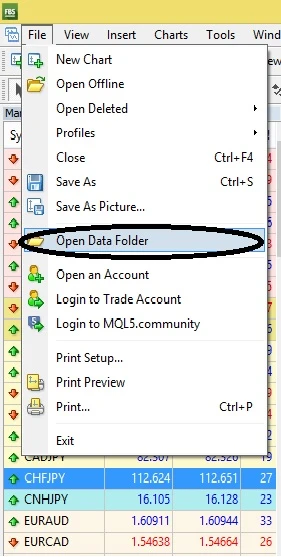
Then you will be directed to where the MQL4 folder is located. Double-click to open the MQL 4 folder.
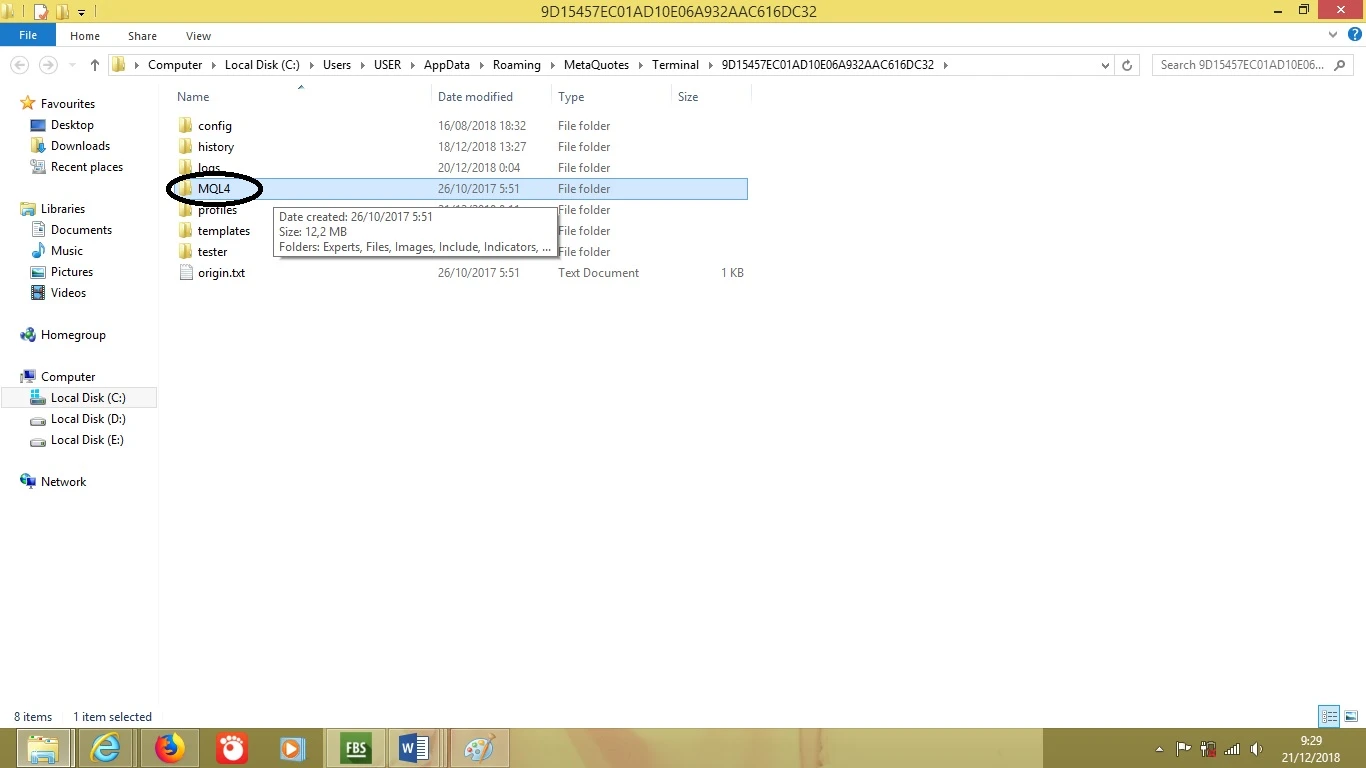
Then you will find several important component folders for Meta Trader. To add custom indicators, you can put them in the indicators folder. To install EAs, you can put them in the Experts folder.
Hopefully this helps.
Add Answer
Forum
view all-
Nominal Balance in Cent Account in FBS
FBS broker10 Year ago
-
Is OctaFX Broker Trusted?
OctaFX Broker11 Year ago
-
Where Do Trader Profits Come From?
Forex trading10 Year ago
-
Who Makes the Price Move?
Forex trading10 Year ago
-
Broker Providing No Deposit Bonus
Deposit Withdrawal14 Year ago
-
What is the Relationship Between Stop Out and Margin Call?
Forex trading11 Year ago
Broker Testimonial
view all-
Consistent "Cashback" Promo
FBS5 Month ago
-
Share my trading experience at IC Markets broker
IC MARKETS5 Year ago
-
Is the WD schedule available on Saturday?
EXNESS6 Year ago
-
Hedging Features and Depth of Market
XM5 Month ago
-
Very pleased
ROBOFOREX3 Year ago
-
6 years and counting
PEPPERSTONE3 Year ago
Most Popular Broker News
view all-
Australian Dollar Hits Multi-Year High as Carry Traders Boost Demand
22 Hours ago
-
Dollar Steady Near Multi-Week Highs Following Inflation Surprise
2 Day ago
-
Sterling Slides as Pressure Mounts on UK Prime Minister Starmer
3 Day ago
-
Gold Gains Cautiously as US-Iran Talks Stall Ahead of Inflation Data
4 Day ago
-
Strong Payrolls Data Keeps Dollar Supported Amid Geopolitical Risks
4 Day ago
-
FirewoodFX Capitalizes on the Booming Prop Trading with New Offerings
7 Day ago
Most Popular Broker Articles
view all-
All-in-One Market Intelligence: Exploring the XM Research Portal
Other Axella Pips
-
Earn Twice on Every Trade: Exploring RoboForex Infinity Program
Axella Pips
-
XM 100% Deposit Bonus: More Margin, Greater Trading Potential
Bonus Axella Pips
-
5 True Stories About Forex Broker Scams
Forex School Tradesmart
-
Beware of Money Game Schemes Posing as Forex Brokers
Forex School Tradesmart
-
6 Ways Forex Brokers Can Scam You
Forex School Tradesmart