Having trouble finding the login on metatrader
Trading Platform
Y
Yoyong Alex
I'm having trouble finding the Log In column, where is it on the PC? It's for logging into Metatrader. I'm using Metatrader 4
5 Answer
E
erik tri cahyo
18 Jan 2021, 06:51
To Yoyong Alex,
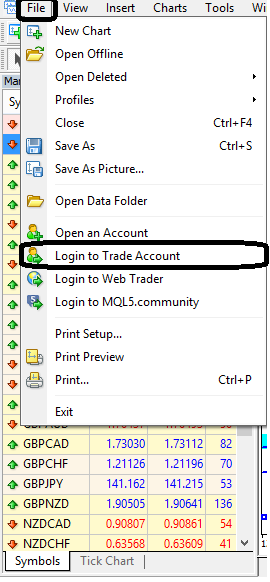
Click the File > Login to Trade Account menu
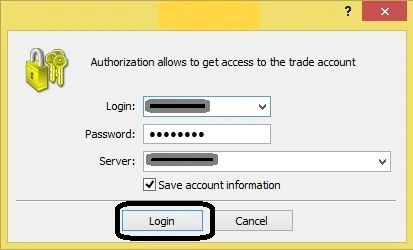
Then enter the login parameters (Login Number, Password and trading server) as provided by your broker. If all data has been entered correctly, finish by clicking the Login button to enter your trading account.
However, if you still can't log in, make sure you ask for help from your broker. Hopefully this helps.
Click the File > Login to Trade Account menu
Then enter the login parameters (Login Number, Password and trading server) as provided by your broker. If all data has been entered correctly, finish by clicking the Login button to enter your trading account.
However, if you still can't log in, make sure you ask for help from your broker. Hopefully this helps.
H
Harisman
20 Jan 2021, 14:43
Sorry to jump in, boss. Regarding the server, it was said to be provided by the broker, but how did you find out about this?
E
erik tri cahyo
25 Jan 2021, 21:01
To Harisman,
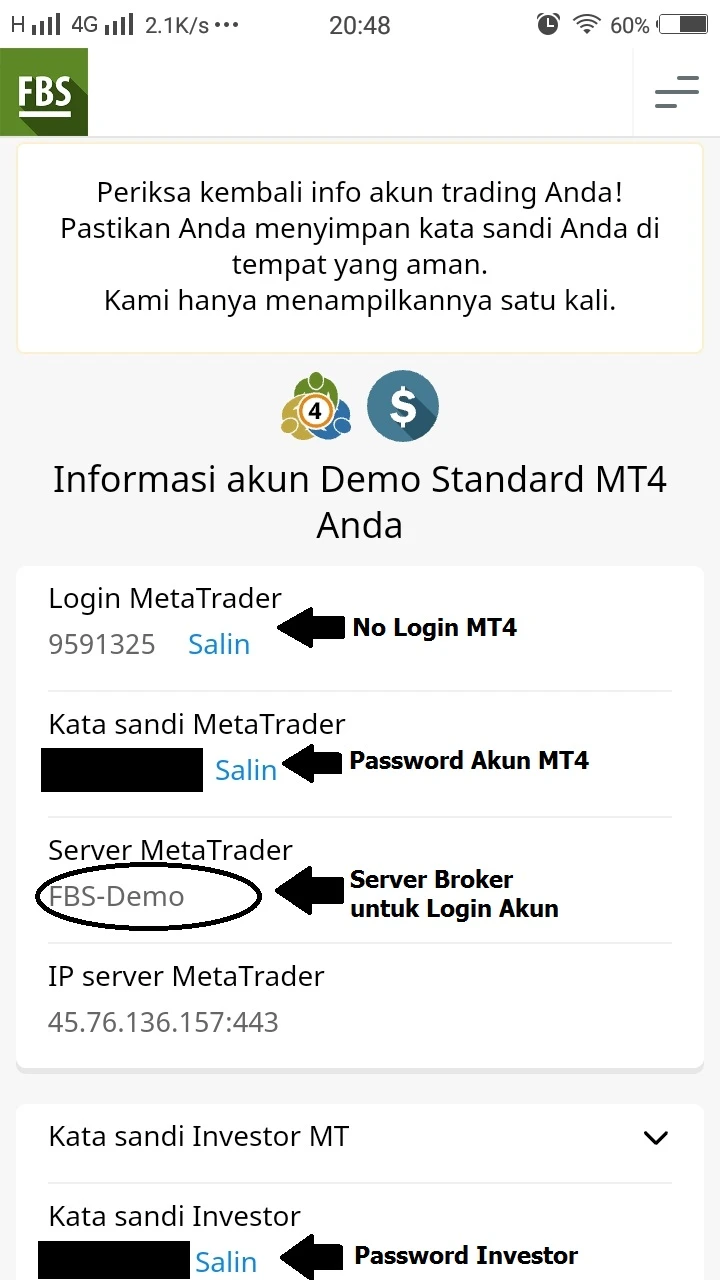
Important data such as account numbers, account passwords, and trading servers are usually provided/displayed once by the broker when opening a trading account. For example, here is the login information display provided by broker FBS when opening an account.
In addition, the broker also sends information regarding the account login to you via email. This way, you will still have the login information as a backup if you need it later.
Hopefully this can help.
Important data such as account numbers, account passwords, and trading servers are usually provided/displayed once by the broker when opening a trading account. For example, here is the login information display provided by broker FBS when opening an account.
In addition, the broker also sends information regarding the account login to you via email. This way, you will still have the login information as a backup if you need it later.
Hopefully this can help.
M
Martin
12 Aug 2023, 22:01
@ Yoyong Alex:
To log in to the Metatrader platform, go to File - Login to Trade Account - fill in the Login number, Password, and Server address.
R
Rizki Rosadi
18 Aug 2023, 09:36
Answer to Harisman: I found out from the broker's notification. All brokers notify you of the server you will use to log in via the account registration notification email.
In that email you can see your login along with the password for logging in.
Add Answer
Forum
view all-
Nominal Balance in Cent Account in FBS
FBS broker10 Year ago
-
Is OctaFX Broker Trusted?
OctaFX Broker11 Year ago
-
Where Do Trader Profits Come From?
Forex trading10 Year ago
-
Who Makes the Price Move?
Forex trading10 Year ago
-
Broker Providing No Deposit Bonus
Deposit Withdrawal14 Year ago
-
What is the Relationship Between Stop Out and Margin Call?
Forex trading11 Year ago
Broker Testimonial
view all-
Consistent "Cashback" Promo
FBS5 Month ago
-
Share my trading experience at IC Markets broker
IC MARKETS5 Year ago
-
Is the WD schedule available on Saturday?
EXNESS6 Year ago
-
Hedging Features and Depth of Market
XM5 Month ago
-
Very pleased
ROBOFOREX3 Year ago
-
6 years and counting
PEPPERSTONE3 Year ago
Most Popular Broker News
view all-
Australian Dollar Hits Multi-Year High as Carry Traders Boost Demand
20 Hours ago
-
Dollar Steady Near Multi-Week Highs Following Inflation Surprise
2 Day ago
-
Sterling Slides as Pressure Mounts on UK Prime Minister Starmer
3 Day ago
-
Gold Gains Cautiously as US-Iran Talks Stall Ahead of Inflation Data
4 Day ago
-
Strong Payrolls Data Keeps Dollar Supported Amid Geopolitical Risks
4 Day ago
-
FirewoodFX Capitalizes on the Booming Prop Trading with New Offerings
7 Day ago
Most Popular Broker Articles
view all-
All-in-One Market Intelligence: Exploring the XM Research Portal
Other Axella Pips
-
Earn Twice on Every Trade: Exploring RoboForex Infinity Program
Axella Pips
-
XM 100% Deposit Bonus: More Margin, Greater Trading Potential
Bonus Axella Pips
-
5 True Stories About Forex Broker Scams
Forex School Tradesmart
-
Beware of Money Game Schemes Posing as Forex Brokers
Forex School Tradesmart
-
6 Ways Forex Brokers Can Scam You
Forex School Tradesmart